|
Basic principles of mirrored and symmetrical arrangement of components |
Scroll |
In the process of designing a product that is symmetrical about a certain plane, it is advisable to create components that are located on one side of the plane of symmetry, and mirror them to obtain components that are located on the other side. In KOMPAS-3D, you can create:
•mirrored components that are new models (model versions),
•additional inserts of the original components, arranged as mirrored or symmetrically.
Principles of mirrored and symmetrical arrangement of components are detailed below.
The source component for mirroring can be any component of the model. When selecting a subassembly, mirrored components are created for all the components it contains.
The added component can be the same as the original one (only mirrored), or have differences in comparison with it. For example, you may need to add a number of structural elements (lugs, chamfers, holes, etc.) to the obtained component, or change the component properties (material, coating, etc.).
Depending on the design tasks, as well as on whether the source component has symmetry, you can use various ways to add a component to the model. For components that do not have symmetry, as a rule, mirrored components are created, for components with internal symmetry it is advisable to use the original component insert in a mirrored view, and for conditionally symmetrical components use symmetrical insert of the original component, placed according to the plane or center of symmetry of the component. These methods are described below.
Asymmetrical component
If the original component does not have symmetry, as a rule, it is mirrored relative to the specified plane of symmetry. The exception is when an asymmetric component can be considered conditionally symmetrical, i.e. the asymmetry of its form does not affect its placement and operation in the required position.
As a result of mirroring, a component is created that is mirrored to the original. It will have a left-side coordinate system (see section Right-Side and Left-Side Coordinate Systems).
|
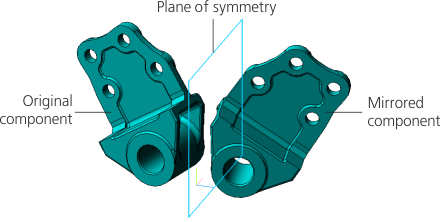
Mirroring of a non-symmetrical component
The resulting component may be a new individual model or a mirrored version of the model. The choice of one of these options depends on the specifics of the source components and the product being designed.
•The mirrored component, created as a mirrored version of the model, maintains an associative connection with the original one. Working with such a component is similar to working with a dependent model version. Specifics of mirrored versions are described in section Mirrored versions of the model.
This option is preferable for a component that should have an associative connection with the original one, but may differ from it to some extent, i.e. permits modification.
•A mirrored component, created as a separate model, has no associative connection with the original one. In the future, you can work with this component the same way as with any other component inserted into the model from a file. When performing constructions in this component, it is necessary to take into account the specifics of the left-side CS.
This option is used if the component should be significantly different from the original one, and also if the original component file is not available.
Symmetrical component
If the original component has symmetry, then as a rule, its mirrored insertion relative to the specified plane of symmetry is added to the model. The resulting mirrored component, in essence, is the same original component but displayed in a mirrored view. All changes made in the source file of the original component model are applied to the mirrored inserts in the same way as to the usual inserts of this component.
This option allows you to place mirrored inserts of components without additional placement settings. For example, you can use this option to add symmetrically positioned inserts of most standard items to the model.
|
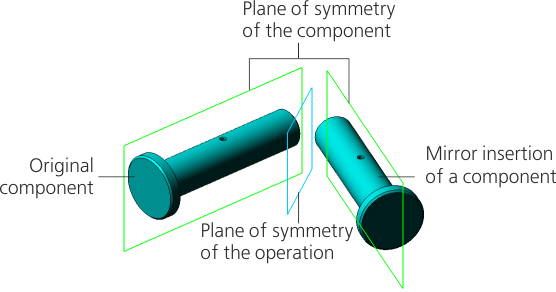
Mirrored insert of a component with symmetry
Conditionally symmetrical component
The symmetry of the component can be accepted conditionally. If the original component is conditionally symmetrical, then as a rule, its symmetrical insertion relative to the specified plane of symmetry is added to the model. The position of the insert is calculated taking into account the plane or center of conditional symmetry of the source component, i.e. flat or point object, relative to which the parts of the component are conditionally symmetrical.
|
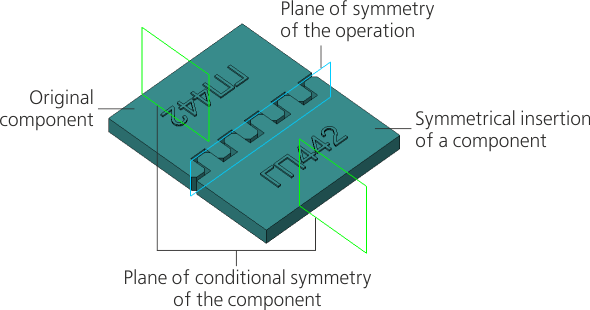
Symmetrical insertion of a component with conditional symmetry
Selection of the plane or center of conditional symmetry can be performed automatically or manually. You can select one of the options automatically offered by the system. If these options do not meet the design conditions, or additional clarification of the component’s position is required, use the manual method of indicating the plane or center of the component’s conditional symmetry.
In some cases, it may be necessary to perform a symmetrical insertion of several components of the same level, which represent a symmetrical or conditionally symmetrical structure, but not combined into an assembly unit. For example, you need to add a symmetrical insertion of a part with standard components to be installed during assembly, such as bolts, oil cans, etc. In this case, the position setting is performed for the part itself, and the position of the remaining components is determined relative to the part, which is selected as the base component. The base component itself and all components for which it is the base component are moved and rotated relative to the original components as one unit.
With a symmetrical arrangement (regardless of the position setting option), the added component is an insert of the original one. This does not create a new model. CS of the insert is rotated or shifted relative to the CS of the original component.
