|
Displaying of the component in the Design Tree |
Scroll |
Components added to the model by mirroring or symmetrical insertion are displayed in the Design Tree under the Components section.
They have icons similar to icons of components of the same type (part, assembly, etc.). If a component is a mirrored version of the original one, then its icon is displayed in a mirrored view (see figure).
Component pictograms may display icons similarly to other objects in the Tree.
|
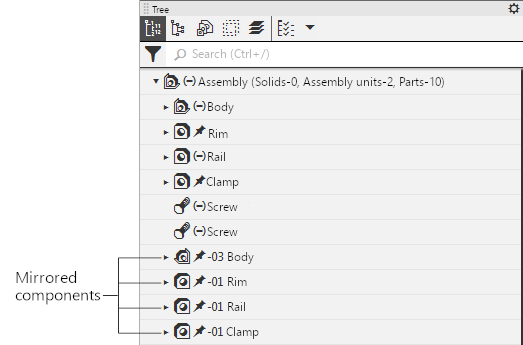
Displaying mirrored components in the Design Tree
Component names are generated automatically in accordance with the configuration (see section Mirroring). If necessary, you can change the component name in the Tree as usual.
The hierarchical arrangement of components obtained by mirroring or a symmetrical insertion in the Design Tree is similar to the arrangement of components obtained by other methods.
If the added component is a mirrored version or a mirrored/symmetrical insertion of the original component, then in the Design Tree under the Components section (or in a group, if grouping is enabled) a separate branch is generated, which includes the original component and the component resulting from the mirroring. Similar branches are obtained when copying components or creating an array of components (see Figure.
More details on the display of objects in the Design Tree are described in section Names and icons of objects in the Tree.
The components obtained by mirroring have a left-sided SC. Specifics of displaying the CS in the model Design Tree are described in section Right-Side and Left-Side Coordinate Systems.
Since mirroring of components is one of the ways to add components to the model, only the added components themselves appear in the Design Tree, a mirroring operation is not created in the Tree.
