|
Structural representation of the Design tree |
Scroll |
The structure of the model is displayed in the Design tree if Structural representation  button is pressed, located at the top part of the Tree panel.
The structure of the model is a set of sections in which model objects are grouped by types (see Figure). Every section of the Tree has its own name and icon. Objects are located within the sections in the order of their creation.
|
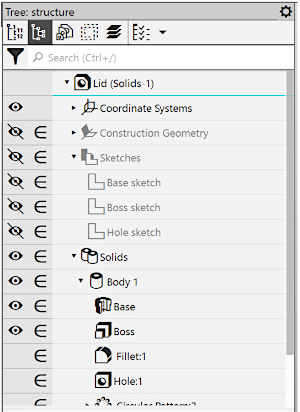
Such objects as Splitting surface, Delete faces, Knit surfaces may be located in the Surface or Solid sections depending on what they belong to. For example, the operation of splitting a solid surface is placed in the section corresponding to this solid, and the operation of splitting surface – in the Surface section.
Objects that belong to several solids, to the solid and surface or to the solid and component at the same time are placed at the first level of the Tree (for example, "Chamfer" applied to the solid and surface; "Hole" applied to the solid and component).
In addition, some wrong operations (for example, those that have the "Undefined operation application area" error) are displayed at the first level of the Design tree.
Objects may be twinned in the Design tree, for example, objects included in macro-elements are located in their places and in the Macro section.
It's available to establish the structure of the Design tree by enabling/disabling display of sections. Details...
The model may contain twin components. For example, several twin components can be obtained by creating the array. Twin components form a branch in the Components section or in a group of components combined by type (groups are displayed in the Design tree when grouping is enabled, see section). Model tree – General display settings). The branch is named by template: <Component name> (xN), where N is the total number of similar components. The figure below shows branches of similar components and groups of components grouped by types.
|
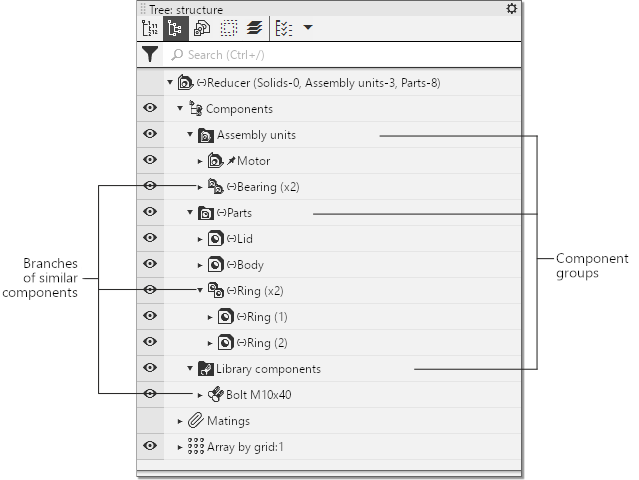
Assembly structure with group display
|
If the component name changes, it is removed from the branch of similar components and takes a separate position in the Model design tree. |

See Also
