|
Establishing Tree structure display |
Scroll |
General settings of the Tree:structure
You can select a default Tree:structure display — Structural representation or Design history, and also enable/disable grouping of components by types. To do this, use the tree general display setting dialog.
Settings of the Tree structure
You can enable/disable display of sections directly in the Tree structure or in the settings dialog.
Configuration in the Design tree is performed using the arrow next to the Tree Structure button  . Clicking the arrow opens a menu with commands named in the same way as the sections (see figure). The Operations outside sections command is an exception — it does not correspond to any section but allows to enable or disable display of operations that are not part of any section in the Tree. Such operations can be arrays in the assembly, editing operations applied simultaneously to several solids, surfaces, or components (for example, "Hole" applied to the solid and component), and others.
To enable or disable display of the section in the Design tree, run the relevant command. A "check mark" next to the command name in the menu means that section display is enabled.
The black background of the Tree structure button shows that the display of all sections in the Tree is enabled. If the display of a section or sections is disabled, the button acquires a gray background. After clicking the button with a grey background, the display of all disabled sections is enabled, and the button background turns black.
|
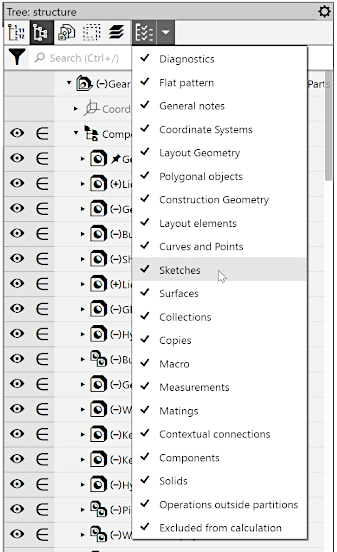
Establishing the Tree structure
"Empty" sections cannot exist in the Tree. Therefore, if display of sections is enabled, they appear in the Tree only after the first object of the relevant type is created in the model. For example, if the model has no sketches, the Tree will not have the Sketches section.
Objects included in the disabled section are still displayed in the graphic area (if their display is not disabled purposefully).
If the model is opened in multiple windows, then settings of the Tree structure which were performed in one of them applies to all windows of this model.
