|
Parameters for designation of position |
Scroll |
Elements of reference number parameters setting are located in the Main section of the Parameter Panel and in the Additional Parameters section of this panel. See the table for description of elements.
Position designation parameter control elements
Item |
Description |
|
Arrow |
The dropdown list allows to select the type of arrow at the end of the leader. The selected option applies to all branches. The list of arrow type is also available in the context menu of the endpoint of any branch of the leader. The list of arrows available for selection, as well as the sequence of arrows in the list is determined by the setting of the filter done in the Reference number – Arrow filter section in the dialog for setting up the current document. |
|
Positions into column/Positions into row |
The toggle switch allows to select the option for placement of the designation containing several reference numbers. •If the switch is in Positions into column, then the numbers are arranged in a column. On the Parameter Panel, there is a group of Direction buttons allowing to set the direction of adding the reference numbers. •If the switch is in the Positions into row state, then the position numbers are arranged in one line. |
|
Direction |
The group of buttons allows to select the direction of adding the reference numbers. Present on the Parameter Panel, if the toggle switch Positions into column/Positions into row is set to Positions into column. |
|
|
The following options are available: •Move Down, •Up. |
|
|
||
Advanced options |
||
Leader Landing |
The group of buttons allows to select the direction of rendering the leader landing: |
|
|
•To the right, •To the left. |
|
|
||
Changing of the direction of the landing makes sense if its rendering is enabled (the Create landing option is enabled). Exception – reference number with the Plain Text shape type: for it the change of direction of landing with the Create landing option disabled means repositioning of the text relative to the leader line (to the left or to the right). |
||
Create landing |
The option controls the rendering of the positional leader line landing. When the option is enabled, the reference number has a landing; when it is disabled, it does not. For positions with the Plain text type, the landing is represent as a regular landing of the leader line above which a text is placed. For positions of other types, a leader landing is a segment connecting the text with the leader line, see the figure below. |
|
Symbol type |
The dropdown list allows to select a shape for the reference number. The following options are available: •simple text, •open text, •circle, •hexagon, •circle with divider. Examples of different types of designations are shown in the figure below. |
|


|
|
a) |
b) |
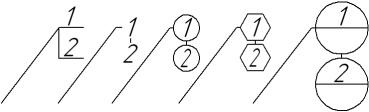
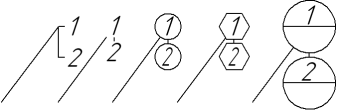
Reference numbers of various types: a) with leader landing, b) without leader landing
