|
Operation result |
Scroll |
When adding and removing material through various operations, you can select what the result of the operation will be. To do this, use the Result button group located in the Main section of the Parameter Panel.
To select operation result, press one of the following buttons.
 Merging — the element merges with an existing solid if they intersect or have a common surface. Otherwise, the element is created as a separate solid.
 New solid — the element is created as a separate solid regardless of whether it intersects with other solids or not.
 Subtraction — the volume obtained as a result of intersecting the element with the existing solid is cut from this solid, i.e., the volume located inside the surface of the element (Fig. b).
 Intersection — in the model, part of the body limited by the surface of the element intersecting this body remains. The rest of the solid (outside the surface of the element) is removed (Fig. c).
|
The Result group may not contain all the buttons described above. The Parameter Panel displays only the buttons of the options that can be used for the current operation. |

|
|
|
a) |
b) |
c) |
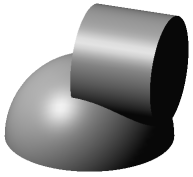
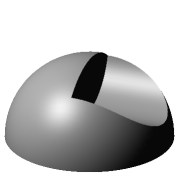
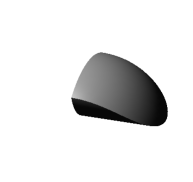
Various cutting methods:
a) source elements; b) result of a cylinder subtraction from a hemisphere,
c) the intersection of the cylinder and the hemisphere
|
An element can intersect one or several solids of the model and / or its components. The setting described above applies to all solids that the element crosses. |
For Merging, Subtraction and Intersection options it is possible to specify the operation application area and the choice of its constituent objects, i.e. objects, the intersection with which will be taken into account when building. For this purpose, the elements of the Application area section are used. For the result of the New solid operation, the area is not specified.
More details on defining the operation application area...
See Also
