|
Methods of passing the corner near the vertex |
Scroll |
The way to pass the corner at the vertex of the baseline is the way to connect the lines of the multiline at the junction of the segments.
When constructing a multiline, the angle traversal method is specified for the initial vertex of the segment being created. The specified default method is used for subsequent vertices. If necessary, you can specify a way to bypass the angle for any vertex of the multiline, except the end ones.
The desired method is selected using the Corner passing group of buttons. The following options are available:
•By sections (Figure a),
•By fillet (Figure b),
•Similar Radius Fillet (Figure c).
|
|
|
a) |
b) |
c) |
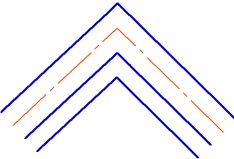
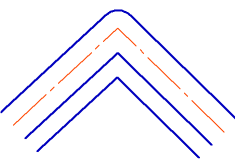
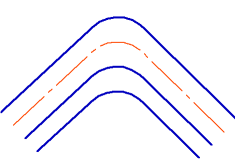
Ways of bypassing the corner at the baseline vertex:
a) slice, b) fillet, c) similar radius fillet
 As an angle
When using this method you can insert a separator at the junction of the multiline segments.
Use the following procedure.
1.Set the Separator toggle switch to I (enabled).
2.Select the type of separator by clicking the desired button in the Separator type group:
 Arched,
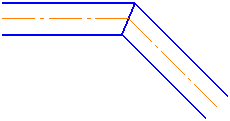
 Angular,
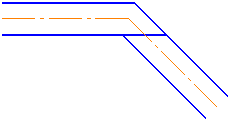
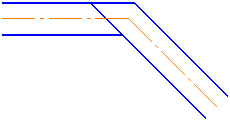
 Overlay.
3.If type selected is Arched or Overlay, specify for which of the two joined segments a separator will be created by pressing the desired button in the Direction group:
 Variant 1,
 Variant 2.
4.If necessary, set the separator line style. To do this, expand the Style list and select the required line in it. More about selecting line style...
The table shows the separators of the multiline segments with different variants of direction.
Multiline Segment Separators
|
|
||
|
Arched |
|
|
|
Angular |
|
— |
|
Overlay |
|
|
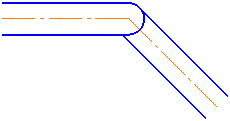
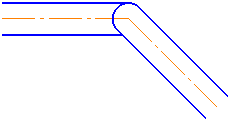
If the drawing style of the arc separator differs from the style of the extreme lines of the multiline, then the junction of the segments looks as shown in the figure.
|

Segment junction with arc splitter
 Pass By Rounding
Lines and multilines at the junctions of segments are filleted with equidistant line radius.
 Pass By Similar Radius Fillet
Multiline lines at the junction of the segments are connected by fillet. The fillet radius for all lines is the same. To enter the radius value, use the Radius field.
