|
Parameters of line with bends |
Scroll |
To configure the parameters of a jogged line, elements of the Parameter Panel located in the Additional parameters sector are used. See the table for description of elements.
Controls of the parameters of the line with bends
Item |
Description |
|
Line Jut |
The field allows for setting the value of a line protrusion beyond the initial and final points. |
|
Number of bends |
The field allows to set the number of line bends. Minimum number of bends is 1. If the set number of bends with the current parameters does not fit between the final points of the line, then the maximum possible integer number of bends is built. |
|
Bend Amplitude |
The field allows to set the bend amplitude. On change of the amplitude, the width of a bend changes in direct proportion. |
|
Bend offset |
The field allows to set the bend offset. |
|
Bend Type |
The group of buttons allows to select the variant of rendering a bend: |
|
|
•With two vertices, •With three vertices. On change of the rendering option, the value of gaps among kinks does not change. |
|
Style |
The dropdown list allows to select the style of rendering a jogged line. The list of styles which are available for selection, as well as their sequence, is determined by the setting of the filter of lines made in the "Break Lines – Line filter" section in the dialog for setting up the current document. |


The default parameters of the line with breaks for the current document are set in the Break Lines – Line with bends subsection in the dialog for setting up the current document.
Bend offset c equals to the ratio of the distance b at which the bends were displaced to the value of a gap between bends, a, expressed as percentage:
c = (b/a) · 100
•If the distance b is zero (and, consequently, the offset c is zero), the bends are equidistant from each other and from the ends of the line (see Fig. a).
•If the distance b is not equal to zero (and, therefore, the bias c is not equal to zero), bends are displaced from the symmetric position. The direction of offset depends on its sign:
•c > 0 — the bends shift in the direction of the endpoint 2 (Fig. b),
•c < 0 – the bends shift towards the initial point 1.
•If the distance b is equal to the interval between the bends, that is, the offset is 100% or -100%, the boundary of the bend coincides with the end point (Fig. c) or the start point (Fig. d).
|
a) |
|
b) |
|
c) |
|
d) |
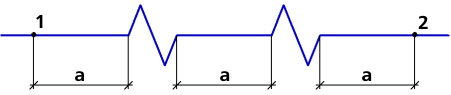
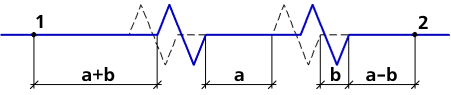
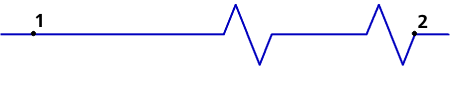
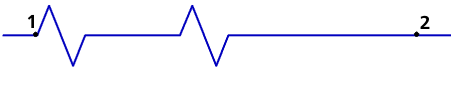
Bend offset
|
The value of protrusions of line outside the initial and final points during bends offset does not change. |

