|
Line with bends |
Scroll |
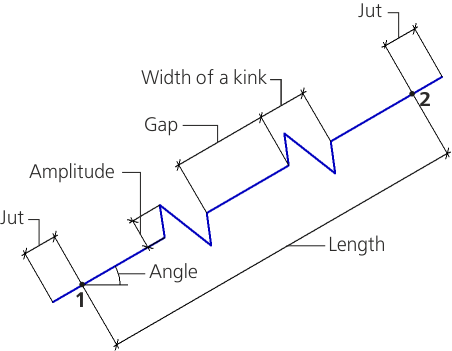
A line with bends is as a segment with evenly placed bends.
A kink is called a fragment of designation that has two or three vertices.
Amplitudeis understood as a distances between the line and the kink point which is most distant from it.
|
a) |
|
b) |
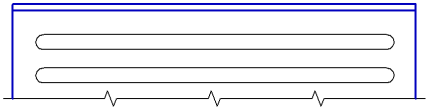
A line with bends and an example of its usage
To build a break line with bends, use the Line with bends  .
.

Step-by-step instructions
1.Specify the Parameters of line with bends. For that, the elements of the Parameter Panel located in the Additional parameters sector are used.
2.Set the points through which there will run a line with bends, using one of the available methods.
•Specify the initial and final points of the line.
•Specify the starting point of the line with bends, set the length and the slope angle of segment of the middle line (an angle between the segment of the middle line and the abscissa axis of the current coordinate system). The length and slope angle of segment are set in the Length and Angle fields.
In the document, a line with bends jutting outside the initial and final points by a jut value will be created.
|
To precisely set the points of jogged line, you can use Snaps and geometrical calculator. |

|
When using a snap to a jogged line in the process of building other objects, the following should be kept in mind: the Midpoint snap allows for binding to the middle of the gap, the Center snap – to the middle of the whole line. |
3.To complete operation of the command, click Finish  .
.
|
The bend amplitude can be set in the graphic area. To do this, after specifying the starting point of the line move the mouse, then press and hold the <Ctrl> key. Move the cursor over the document field — the bend amplitude will change. The amplitude value at the current cursor position is displayed in the Bend Amplitude field of the Parameters panel. Having reached the desired value, release the <Ctrl> key. |

