|
Specialties of editing a wavy line |
Scroll |
It is possible to edit the selected wavy line using controls on the Parameter Panel or by changing the position of its defining points in the graphic area.
A wavy line has three defining points: an amplitude point located at the first half-wave and two points located at the ends of the line (see the Figure).
|
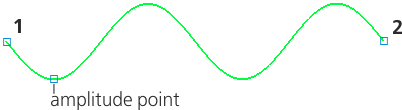
Defining points of selected wavy line
On change of the amplitude of the wavy line by moving the point of amplitude, the number of half-waves and the length of the middle line remain the same.
On change of the length of the middle line by moving the defining points 1 and 2, the number of half-waves, amplitude to wavelength ratio, or the value of amplitude in millimeters, may change – depending on which parameters were set while building.
For example, the wavy line is built using the By number of half-waves method, and the value of amplitude was set in millimeters. As a result of change of the length of the middle line, the number of half-waves and the value of amplitude will retain, but the wavelength and the amplitude to wavelength ratio will change.
|
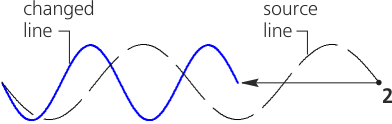
Movement of the characteristic point 2
Construction method By number of half-waves, units of amplitude — Millimeters
If using the By wavelength method of building the characteristic points 1 and 2 approach at a distance less than half of the rated wavelength, one half-wave of the actual length is built. At the same time, the value of rated wavelength retains.
|
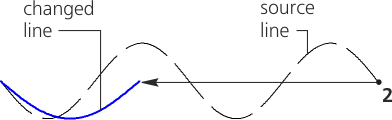
Approach of defining points at a distance smaller than half of the rated wavelength
Similar changes occur to the wavy line while performing the Scaling operation.
To edit the wavy line using commands applied to geometric objects — Trim a curve, Split curve, etc., it must first be converted into a spline.
