|
Hole depth |
Scroll |
The hole depth is specified using the Depth buttons in the Hole group in the Parameter Panel.
Select the method to define the hole depth and configure the required parameters. Depth setting parameters are listed in the table.
Method to define the hole depth
Depth |
Rules for plotting |
|
|
To Distance |
Depth of a hole is determined by the distance from its base point to the center of the flat edge of the straight circular cylinder of the hole. Set the distance value in the Distance field. You can select the bottom shapes. The bottom depth is not considered when specifying the distance. |
|
Through All |
Depth of a hole is determined by the distance from its datum point to the intersection point of the hole axis with a plane that is perpendicular to the axis and passes through the most distant point of the model's bounding box from the snap point. |
|
To object |
Depth of a hole is determined: •When specifying a surface, by the position of the specified face or plane. •When specifying a point object, by distance from the base point of the hole to the projection of the point object onto the hole axis. The name of the specified object is displayed in the Object field. |


When specifying depth in a hole from library there are some specifics (see below).
Specifics of setting depth in a hole from library
•The Depth button group is absent in the Parameter Panel when constructing central holes. Central hole depth is determined by depth parameters: l, l1, l2, l3,H etc. The set of parameters depends on the type of hole (Form A, Form B etc.). Parameter values are displayed in the hole parameters table where you can change them.
•For depth setting options Through All and To object the calculated hole depth is displayed in the hole parameters table, and in the Changed column; next to its name, a checkmark appears. You cannot change depth in the table.
•If you choose To object depth setting option and specify a surface, then the hole depth is determined by the point of intersection of this surface with the hole axis. So, if the surface is not plane or is not perpendicular to the hole axis, then the hole may be not fully cut through its depth, see figure.
|
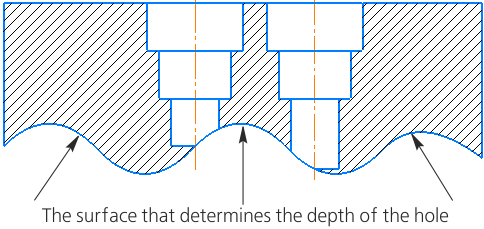
An example of setting the hole depth from a library using To Object,
the object is a non-planar surface
