|
Attribute of several graphical objects |
Scroll |
Attribute may be assigned not only to a single object but also to multiple objects simultaneously. In this case a so-called group attribute is created. Group attribute can be assigned only to graphical objects; you cannot assign a single attribute to several documents at once.
To assign a group attribute, select the required objects and perform the same actions as when assigning an attribute to a single object (assigning a single attribute) (see section Attribute of a single graphical object. Document Attribute). The figure shows the dialog for working with object attributes, which include both individual (own) attributes and group (shared with several other objects) attributes. The attributes are contained in separate sections of the list: Object attributes and Attributes of Object Group.
|
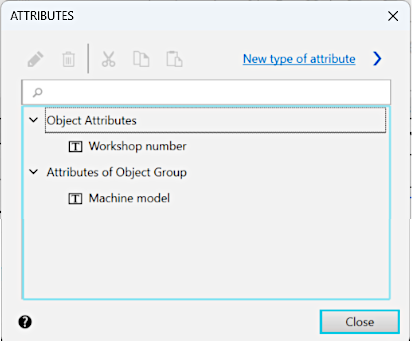
Object attributes: single and group attributes
While working with group attributes take following particularities into account.
•When you edit group attribute value it changes for all objects in the group.
•Group attribute is moved into clipboard according to the removal rule above.
•A group attribute is deleted only after it is removed from the last object of the group or if it is removed when all of the group's objects are selected.
|
When attempting to delete or edit a value of group attribute a warning message is displayed. |

•If you have selected one object, moved a group attribute of this object into clipboard and pasted this group attribute out of clipboard, this attribute will be saved as a proper (single) attribute of another object.
