|
Starting point of curve |
Scroll |
When specifying a curve, one of its points is selected as the starting point of a curve, i. e. the point from which array construction begins. When determining the construction path, the curve is moved so that its starting point is aligned with Base point of the base instance array.
More details on constructing the trajectory...
Starting point of a curve is determined in the following way.
•If the curve is open-ended, then one of its terminal points that is closer to the object being copied is selected as the starting point of the curve. No other point can be selected.
•If the curve is closed, then by default its first vertex is selected as the starting point of a curve (when a chain of curves is used, the vertex of one of these curves that is closest to the object being copied is chosen). This vertex is marked on the phantom. Building direction is indicated by an arrow.
If the curve is closed, you can select another point on the curve as the starting point. To do this, activate the Starting point field in the Array parameters section (this field appears on the Parameter Panel when you select a closed curve) and choose the required point on the selected curve. Name of the point displays in the Starting point field.
Locations of array instances in case of different choices of starting point are illustrated on the figure.
|
|
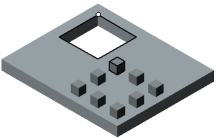
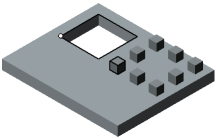
Location of array instances depending on position of initial curve point
(copying path and object being copied are highlighted,
initial point is marked with a circle)
