|
Placement of array instances by sample |
Scroll |
The method of arranging instances is determined by the position of the Relative Placement switch in the Array Parameters group on the Parameters toolbar:
•0 (disabled) – instances are placed by array sample parameters (Default variant).
This means that instances of the array being created are placed relative to the component being copied as instances of the sample array are placed relative to its base instance.
•I (enabled) – relative placement of instances.
In this case placement of component being copied is determined relative to selected instance of sample array. It serves as a placement model for all instances of the array being created: they are placed relative to corresponding instances of the sample array in the same way as the copied component is placed relative to the selected instance of the sample array.
Detailed description of instance placement methods is given below.
Placement by array sample parameters
This method of placement puts instances of the array being created to the same positions relative to the component being copied as instances of the sample array are placed relative to the base instance of the sample array (i.e., the result of constructing the array by sample is the same as it would be when creating an array of the same type and with the same parameters as the sample array).
|
If the sample uses array by points or by table, this method of placement means placing instances of the array being created at the same positions as the instances of the sample array. |

Example of instance placement by parameters of the template array is given on the figure. As a sample, an array on a grid is used — its instances are shown in gray color. Original object of each of arrays is indicated with thick line.
|
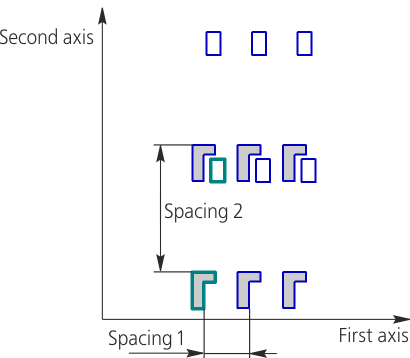
Location of instances according to parameters of sample array
This method places instances of the array being created relative to corresponding instances of the sample array as copied component is placed relative to the chosen instance of the sample array. By default, instance closest to the component being copied is selected as such instance in sample array (if multiple components are copied, then instance closest to the component that was specified first).
If necessary, you can change the sample array instance relative to which instances of the created array are placed. To do this, activate Sample Array Instance field and specify the required instance of the sample array in Design Tree or in the graphic region of the model. Name of the selected instance appears in the field, and array phantom is rebuilt.
|
If the sample uses array by points, this means that when choosing relative placement, instances of the array being created are placed relative to the component being copied in the same way as instances of the sample array are placed relative to their base object. |
Examples of relative placement of instances are given on the figures. An array by grid is used as a sample array – its instances are marked with light gray color. Copied instance of the array being created is shown in dark gray color. Instance of the sample array, relative to which instances of the array being created are placed, is indicated with thick line.
|
|
a) |
b) |
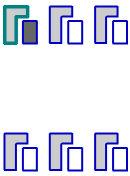
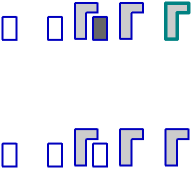
Instance placement using Relative placement:
a) base instance of sample array is selected by default;
b) base instance of sample array is selected by user
