|
Insertion a table from a file |
Scroll |
The ability to insert tables from external files allows you to reuse once created standard tables.
Insertion of a table from a file into the document is performed by embedding. Thanks to this, when transferring this document to other workplaces, you don't need to worry about transferring the file from which the table was inserted.
To insert a table from an external file, in the New Table dialogpress From File... button
A file open dialog appears on the screen. The following file types are available:
•*.tbl — special format KOMPAS-3D for storing tables,
•*.frw — fragment of KOMPAS-3D.
After selection and opening a fragment, a Table Creation Options dialog appears on the screen, where you can set up some parameters of the generated table.
|
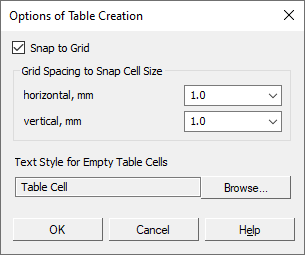
Description of elements in the Table Creation Options configuration dialog...
On automatic generation of a table from a graphic fragment, all the texts, horizontal and vertical segments existing in it are taken into account. Other objects are not involved in the formation of the table. The styles of texts and segments are preserved in the resulting table (in the form of cell text styles and cell border line styles).
