|
Orientation of instances by specified object |
Scroll |
Instances of an array by points can be oriented by the normal to the specified object. The following may be used as an object:
•an edge, 3D curve or a sketch line (except straight ones);
•a face (except flat faces).
The figure shows an example of the placement of array instances oriented by a spherical facet.
|
|
a) |
b) |
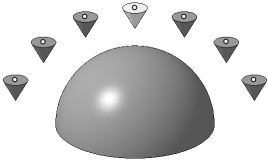
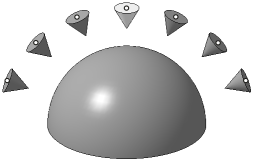
Example of array instances location
(the base instance is highlighted in color)
a) with preserved original orientation; b) with orientation by spherical facet
To change instances' orientation in space relative to the object, press the Orient by specified object  button in the Object group of the Array parameters section. The Objectfield will appear on the Parameter Panel next to the Object group.
Specify the desired object. The selected object is highlighted with color and its name is displayed in the Object field.
Instance orientation is determined as follows:
1.The nearest projection of the point that determines the instance position (point A) to the specified object is constructed.
2.The nearest projection onto the specified object of the base point of the base instance is being constructed (point B).
3.The instance is rotated around its base point so as to be oriented relative to the normal to the specified object in the point A as the object being copied is oriented relative to the normal to the specified object in the point B.
|
If points that set instance positions are not projected on the specified object then instances corresponding to those points are oriented in space in the same way as the object being copied. |

