|
Orientation of instances by an object associated with points |
Scroll |
If position of an instance of array by points is specified by a point that belongs to a curve or a surface, you can orient such an instance relative to this curve/surface. To do this, use Orient by object linked to the point  button of the group Orientation section Array parameters.
This button is available when following conditions are met:
•the point is plotted using one of the following commands: Point on curve, Point On Surface, Group of points by curve, Group of points by surface,
•the point lies on a non-flat surface or on a non-linear curve.
When the button is pressed, the instance is oriented as follows:
•Point lies on the curve
The instance is rotated around its base point so that its orientation relative to the tangent vector of the curve in this point is the same as the orientation of the copied object relative to the tangent vector of the curve in the point of this curve that is closest to the base point of the copied object (Figure a).
•Point On Surface
The instance is rotated around its base point so that its orientation relative to the normal of the surface in this point is the same as orientation of the copied object to the normal of the surface in the point of this surface that is closest to the base point of the copied object (Figure b).
|
|
a) |
b) |
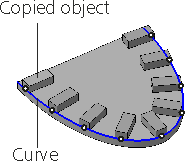
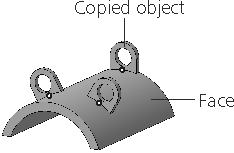
Example of array instances location:
a) with orientation by curve; b) with orientation by surface
|
Set of specified points may include points that do not lie on a curve or a surface. The Orient by object linked to the point button has no effect on instances with positions specified by such points. They will have the same orientation in space as the object being copied. |

