|
Extrusion direction and depth |
Scroll |
To construct an extrusion, it is necessary to determine its direction and depth.
Extrusion can be performed in one direction and in two opposite directions. For each direction, you need to select a method for determining the extrusion depth and set the parameters corresponding to the selected method.
The desired method is selected using the Method group of buttons. The following options are available:
 At Distance,
 Through all,
 To object,
 To nearest surface.
More about methods for determining extrusion depth...
To construct in one direction, the selection of the method and the setting of its corresponding parameters is performed in the Main section of the Parameter Panel. If you want to extrude an element in two directions, then set the Second direction toggle switch in position I (on) and set the desired parameters for the second direction.
The parameters set for the second direction may differ from the parameters set for the first one.
The arrow on the phantom shows the first extrusion direction.
If necessary, you can change the first direction of extrusion to the opposite. To do this, in the Main section of the Parameter Panel, click the Change Direction  button to the right of the Distance field. The changing of direction is available for all methods except the method To object.
If the method of determining the depth for the first direction is To Distance , you can perform a symmetrical construction. To do this, set the Symmetrically toggle switch in position I (enabled). Setting the second direction becomes unavailable. In the Distance field enter the total value of the extrusion depth. The construction will be performed symmetrically in both directions from the section.
|
For each of the directions, both positive and negative extrusion depths can be specified. The negative depth is measured in the opposite direction to the positive. This allows for extrusion in two directions to create an element that is distanced from the section (see the figure). For correct construction, the values must not be equal in magnitude. |

|
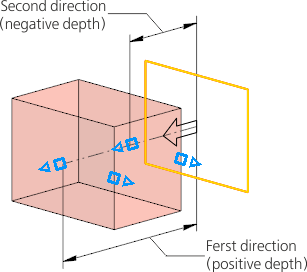
An example of extrusion in two directions: for the first direction, the positive extrusion depth is set, and for the second one – negative
