|
Construction of instances with radial alignment |
Scroll |
If instances positions are set in cylindrical or spherical coordinates, the instances can be oriented in radial direction. To do this, use the Set Radially  button from the Orientation button group in the Array Parameters section.
When this button is pressed, instances are oriented as follows:
•Cylindrical coordinates
Each instance is rotated around its own Base Point so as to be oriented relative to the perpendicular dropped from this point to the Z-axis, just as the base instance is oriented relative to the perpendicular dropped from its base point to the Z-axis (see Figure a).
•Spherical coordinates
Each instance is rotated around its own base point so as to be oriented relative to a ray drawn from the center of the sphere to its base point in the same way as the base instance is oriented relative to its ray drawn from center of the sphere to its base point (see Figure b).
|
|
a) |
b) |
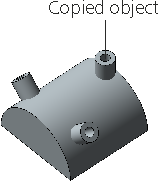
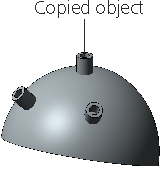
Example of aligning array instances in the radial direction:
a) positions are given in cylindrical coordinates;
b) positions are given in spherical coordinates
