|
Methods for constructing an element at the extreme sections |
Scroll |
You can specify the direction of the tangents to the element, drawn through the contour points at the element's extreme sections. In other words, you can change the direction of the element's "exit" from the first section and the direction of the element's "entrance" into the last section.
Methods for constructing an element at the extreme sections are selected using the Initial section and Final section button groups. The following options are available:
 Automatically — the vertices of the sections are connected with third-order splines (Figure a).
 Perpendicularly — the element is formed so that the plane tangential to its surface near the boundary (initial or final) section is perpendicular to the plane of this section (figure b).
 By object — the element is formed so that the plane tangent to its surface near the boundary section is parallel to the specified straight-line object or perpendicular to the specified flat object (see drawing b).
To define an existing object, specify it in the Design Tree or in the graphic area. The name of the selected object will appear in the Object field.
To build the axis, press the Build Axis  button to the right of the Object field.
|
|
|
a) |
b) |
c) |
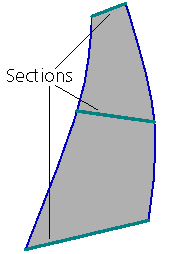
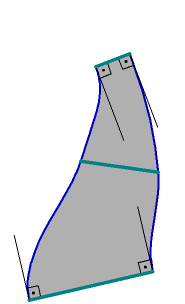
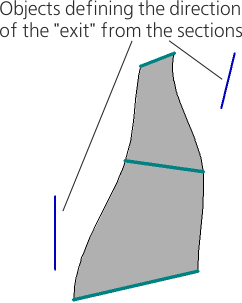
Methods for constructing an element at the extreme sections:
a) Automatically, b) Perpendicularly, c) By object
 Dome (the method is available if the section is a single point in the sketch) — the element is formed so that the plane of the section — the sketch with the point — is tangential at this point to the surface of the element. Generating lines of the element converge in the section-point.
The dome shape is determined by the value of the coefficient set in the Coefficient 1/Coefficient 2 field (the field is present on the Parameter Panel if the method Dome is selected). The less the coefficient value, the more "acute" the dome will be.
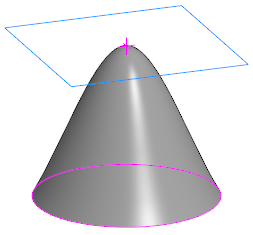
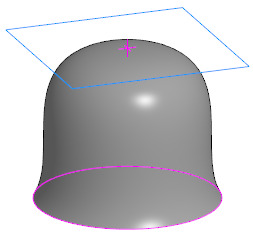
Examples of constructing an element using the Dome method:
a) with a smaller coefficient, b) with a larger coefficient
|
If the item is created with Closed trail or with the use of Guide curves, the choice of method for constructing it at the extreme sections does not matter. |

