|
Conditional intersection parameters |
Scroll |
The elements for setting up the parameters of conditional intersection are presented in the table.
Controls for conventional intersection parameters
Element |
Description |
|
Leader lines |
The toggle switch controls the display of extension lines of objects. Is present on the Parameter Panel, if the Intersection point toggle switch is in the position I (enabled). •If the Leader lines toggle switch is set to the position I (enabled), then the extension lines of objects are displayed. On the Parameter Panel, there are elements for adjusting the extension lines. •If the toggle switch is set to the position 0 (disabled), then extension lines are not displayed. |
|
Enable |
The group of buttons allows to select an option of rendering extension lines of objects: |
|
|
Two Lines |
•both extension lines are displayed, |
|
First line |
•the extension line of the first object is displayed, |
|
Second line |
•the extension line of the second object is displayed. |
Gap/Length |
The toggle switch allows you to select which parameter of extension lines needs to be set: the gap between the final point of an object and the start of an extension line, or the length of the extension lines (see the figure below). To set a gap between the object and the start of extension lines, set the toggle switch to the Gap position, and to set the length of extension lines — to the Length position. |
|
Value |
The field to input the value of parameter of extension lines. Only integer values are allowed. At a zero value (or a value exceeding the distance from the object to the intersection point), extension lines are drawn from the endpoints of objects to the intersection point. |
|
Intersection point |
The toggle switch allows you to create a point at the intersection of extension lines of objects. •If the toggle switch is set to the position I (enabled), then the point is created; below the toggle switch is a dropdown list to select the point style. •If the toggle switch is set to the position 0 (disabled) — the point is not created. |


|
|
a) |
b) |
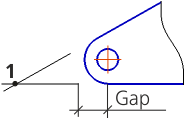
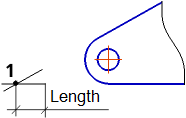
Rendering of extension lines when setting a non-zero value
a) of gap; b) of length
Parameters of conditional intersection are retained until the end of the session.
The default values for the parameters of conditional intersection for the current document, including the extent of the extension lines' protrusion beyond the intersection point, are set in the Conditional Intersection section of the current document's setup dialog.
