|
Conditional intersection |
Scroll |
Conditional intersection is a designation representing intersection of the continuation of an object with another object or its continuation. Object extensions are constructed as extension lines. At the intersection of the leader line with an object or another leader line, a point can be created.
You can use the following objects for conditional intersection:
•segments,
•arcs of circles and ellipses,
•Equidistants of line segments and arcs of circles,
•Straight and arc centerlines not included in axis grids.
Objects can be part of macro-elements, inserts of fragments, and views.
To construct a conditional intersection of objects, you use the Conditional Intersection  command.

After invoking the command, the cursor will take the shape of a square "trap".
Step-by-step instructions
1.Specify in the graphic region, the first object for creation of conditional intersection.
The name of the selected object will appear in the Objects field on the Parameters toolbar.
2.Set up the Parameters of conditional intersection.
3.Indicate the second object closer to that its final point from which the continuation will be built. Once the second object has been captured inside the cursor "trap", a phantom of conditional intersection appears in the graphic region. That occurs if for this pair of objects there exists at least one option of creation.
If there are several intersection points, then to display another option of the phantom move the cursor closer to the other finial point of the object.
|
The size of the cursor’s trap can be changed in the dialog for setting up the cursor. |

After indication of the second object, creation of conditional intersection automatically ends.
4.To complete operation of the command, click Finish  .
.
|
To run the command, at least one object of the indicated pair should be continued. The intersection points of objects (not their continuations) are not built. If you need to specify those points, use the command Intersection Points of Two Curves or All Intersection Points of Curve. |

|
|
a) |
b) |
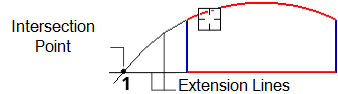
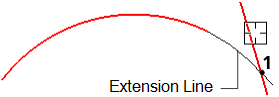
Conditional intersection
a) for continuations of two objects; b) for an object and continuation of another object
By default, the created conditional intersection is not related to objects specified during execution of the command, and can be edited separately. Creation of associative (relative to the datum curves) detailing objects is possible using the parametric mode.
|
Conventional intersection of truncated objects can be built during building Chamfers or fillet. It is also possible to set coordinates of objects using the Conditional Intersection commandgeometrical calculator. |
