|
Chamfer construction |
Scroll |
In KOMPAS-3D, it is possible to build:
•Chamfer,
A chamfer at the intersection of two segments or their extensions is built by the Chamfer  command. This command also allows you to build a segment connecting two arbitrary curves.

Step-by-step instructions
1.Select method of setting chamfer parameters. To that end, in the group Construction Method on the Parameters panel, press the By Two Lengths  or By Length and Angle
  button.
2.Specify the lengths (or length and angle) in the respective fields.
3.Specify the first and second construction objects.
A chamfer will be automatically created. Its style coincides with the style of the first of these objects.
4.To complete the command, click the Finish  button.
|
|
a) |
b) |
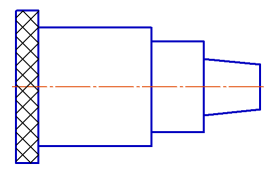
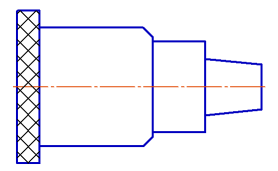
Chamfering: a) the original image, b) the result of the command
The Chamfer on vertices of an object  command allows you to create chamfers on vertices of the following objects: a contour, a polyline, a rectangle, a polygon, and a multiline.
|
Cannot apply Chamfer Object Corners command to a rectangle/polygon, broken into segments, and to a broken line in a sketch (it is divided into segments automatically). |

Step-by-step instructions
1.Select method of setting chamfer parameters. To that end, in the group Construction Method on the Parameters panel press the By Two Lengths or By Length and Angle button.
2.Specify the lengths (or length and angle) in the respective fields.
3.The chamfer is built either at the specified corner, or at all object corners. To select the required option, in the group Process Angles press the Specified  or All
  button. You can temporarily switch between these options by pressing <Ctrl>.
4.Click on the object segment near the corner where you want to build the chamfer. To create chamfers at all corners, specify any point of the object.
Chamfers will be automatically built. They have the same style as the object.
5.To complete the command, click the Finish button.
|
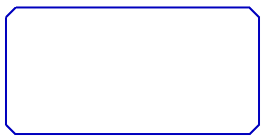
Chamfering at all corners of the rectangle
