|
Changing the Bend State |
Scroll |
A sheet element containing bends may be in a folded or unfolded state.
|
|
|
a) |
b) |
c) |

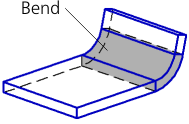
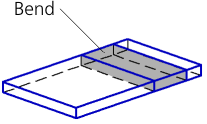
Building a bend
a) base face and bend line, b) folded bend, c) unfolded bend
To change the state of a sheet element, use the Unfold and Fold commands in the element context menu in the Design tree. After running one of these commands for a sheet element, another command appears in its context menu. For several selected elements, both commands may be available.
If a sheet element contains multiple bends (such as, for example, an incision), after running the Unfold/Fold commands all of its bends will be unfolded/folded.
The icon of an unfolded sheet element is marked in the Design tree with the 'unfolded' sign  .
.
To disable the "unfolded" sign for sheet elements (and, accordingly, to fold all their bends), select these elements and run the Fold command from the context menu.
To enable the "unfolded" sign for sheet elements (and, accordingly, to unfold all their bends), select these elements and run the Unfold command from the context menu.
The Unfold and Fold commands from the context menu are not available for shell rings and sheet elements without bends (for example, plates).
Any unfolded element can be bent using the Fold command, and a bent element can be unfolded using the Unfold command from the Modelling — Sheet modelling menu.
