|
Fixed Face or Plane |
Scroll |
To complete unfolding/folding of bends of the sheet part, you should specify the plane which will remain immovable and within which an unfolded/folded bend (bends) will be located.
To set a fixed plane, specify the required object in the graphics area. The name of the selected object is displayed in the Fixed Plane field on the Parameters bar.
You can specify the following as the fixed plane:
•a flat face of the sheet part belonging to the portion which will remain immovable after a bend (bends) are unfolded/folded,
•an construction plane tangential to the bend face,
•a bend face – in this case an auxiliary plane is automatically created and located in one of the face vertices (see Figure).
|
|
a) |
b) |
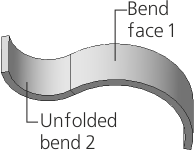
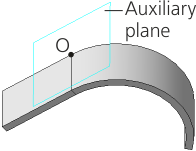
Unfolding a sheet part
a) initial part state, b) result of unfolding bend 2 (when specifying the face of bend 1)
You can build an construction plane of the required position using the Unfold command and use it as the fixed plane. To do this, press Construct Plane  button to the right of the field Fixed Plane.
The Figure shows dependence of the operation result on the selection of the fixed face on the example of bend unfolding.
|
|
|
a) |
b) |
c) |
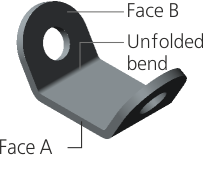
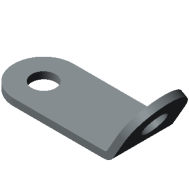
Dependence of the unfolding result on the unfolding plane selection
a) initial part state,
b) unfolding plane — face A, c) unfolding plane — face B
|
If an auxiliary plane was used during the bending, to return the body to its original — bent — state, specify this plane as fixed in the Fold command. |

