|
Notes on Working with Locked Components |
Scroll |
This section specifies constraints applied to locked assembly components.
General Features
If component is locked for editing, you cannot do the following while working with this component:
•delete from the assembly in any way,
•edit in the window or in the assembly context,
•manage inclusion to calculation,
•edit properties,
•explode (if the component is a subassembly),
•sweep and rotate,
•change a load type,
•change the version.
Working in the Model Design Tree
If component is locked for editing, the following constraints are applied to the component in the Design Tree.
•Commands from the context menu are not available, so you cannot execute them.
•The component is not included into a new subassembly that is built by merging the selected components.
•You cannot view the component contents.
•You cannot edit the component name.
•You cannot copy or transfer other components to a locked subassembly.
Execution of Operations and Construction of Objects
If component is locked for editing, you cannot apply operations to this component which result in creation or removal of faces and edges (Chamfer, Hole, Array, Splitting surface, Delete facets etc.).
If component was locked for editing after applying the operation to this component, the operation is blocked. If the operation is blocked, you cannot:
•edit,
•directly change values of variables (values of variables can only be obtained by reference or as a result of calculating expressions),
•delete,
•manage inclusion to calculation,
•use as the source array element.
Blocked operations in the Design Tree are marked with a lock icon, see the Figure below. Blocked operations are still valid for the component that has locked editing.
When component is unlocked, the blocked operation applied to this component is unblocked as well.
|
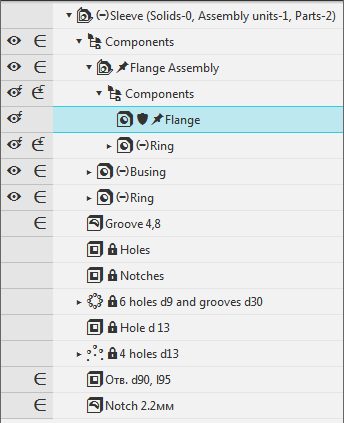
Model objects blocked as a result of locking one of the components
, which do not assume changing of faces and edges, can use components that are locked for editing. For example, a face of the part may serve as a slope base in the Slope command or an initial surface in the Thicken command.
In addition, objects that belong to the component and are locked for editing, can be used as a basis for new objects. For example, a face of the part may be used to create a sketch or mark designation; points created in the component may be used to construct auxiliary axes and planes, etc.
|
You can use locked component to construct other objects if this component has a Full load type. |

Array of Components and Insertions from the Same Source
•You cannot create an array of components that are locked from editing.
•If after array is created, at least one of its initial component is locked for editing, this array and its instances will be blocked (similarly to the operation applied to the component that is locked for editing, see above).
•Copies of components resulting from creation of the array or from reinsertion combine a group in the Design Tree. In the first case, all group components are automatically locked for editing or unlocked after assigning or cancelling a lock for one of the components in a group. In the second case, each component in a group should be individually locked or unlocked.
|
Changing a load type for one component is applied to all of its insertions regardless of whether they are locked or not. |
Matings
•A component that is locked for editing cannot participate in mating.
•If after a mate is created, at least one of its components is locked for editing, this mate will be blocked (similarly to the operation applied to the component that was locked for editing, see above).
A blocked mate does not operate.
•If a component is deleted from the assembly and it was mated with locked component, the blocked mate is also deleted. After unlocking or after the assembly is reopened, location of the component is calculated again according to the mates left.
|
If an object used for mating (e. g. an edge) is deleted, the blocked mate is not deleted but marked as wrong. |
Variables
•You cannot directly change values of variables of the locked component.
•Variables of the component that is locked for editing can obtain values by reference or as a result of calculating expressions in which they participate.
BOM objects
•You cannot edit a BOM item of the component that is locked for editing.
•Changes in the BOM item of the component that is locked are transferred to the assembly when this component is unlocked or after the assembly is reopened.
Rebuilding
•If the source file of the locked component was edited, it will be automatically rearranged when you open the assembly, without a rearrangement request.
•You can rearrange a locked component after its source objects or values of variables were changed in a usual way by clicking the Rearrange button.
Model versions
The component lock for editing is transferred from the initial version with an assembly component to the dependent versions. If the component in the initial version is locked for editing, it cannot be edited in the dependent version as well. In this case the lock icon next to the component in the Design Tree of the dependent version is replaced with a shield icon.
You cannot cancel the link with such component in the initial assembly version because Cancel Link command is not available in the component context menu of the Version tree.
