|
Geometrical calculator |
Scroll |
One of the methods to set numerical parameters of objects is reading out parameter values from objects which already exist. To do this use so called geometrical calculator. Using the geometrical calculator you can, for example, to make the slope angle of the segment being created to be equal to the aperture angle of an arc that already exist in the document.
The geometrical calculator commands are contained in the menu of numerical parameter entry fields. This menu is called by clicking the icon  , located to the right of the field name. The set of commands depends on the object type and the parameter type.
|
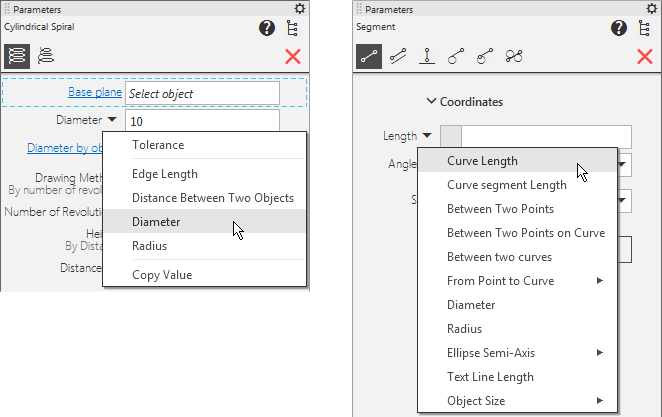
Geometrical calculator for linear values in the model and in the graphic document
After invoking a command of the geometrical calculator, the subprocess is launched, allowing to specify the object or objects to read out the parameter value from.
After specifying the desired object(s) the subprocess is completed automatically: the system returns to the command the geometrical calculator was launched from, and the obtained value is passed into the appropriate numerical field and fixed.
If necessary, you can interrupt the geometrical calculator subprocess by clicking the Complete  button in the Parameter Panel header. The system will return to the command but without defining the numerical parameter.
|
If before invoking a geometrical calculator command the value was fixed, then the calculator will enter and fix the new value in the parameter field. |

