|
Entering numerical parameters in the predefined order |
Scroll |
During construction you can use predefined entry of object parameters. This entry method is supported for parameters which are not coordinates of point, such as length, angle, distance etc.
Predefined entry allows to set the values of parameters required to create an object, without activating the Parameter Panel fields. They are activated automatically when entering values from the keyboard.
The parameter set for the predefined entry and the sequence of their activation are stored in the system. The field of the current parameter, i.e. the parameter the system expects to be entered at this time, is highlighted (see figure).
|
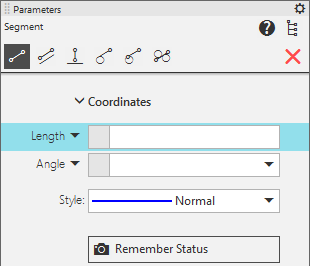
The first field in the predefined entry of line segment parameters is Length field
When entering the value from the keyboard, the highlighted field of the Parameter Panel is automatically activated: its highlighting disappears, and the entered value is written in the field. To fix this value, press <Enter> key. The system will proceed to specifying the next predefined parameter – its field will be highlighted in its turn.
Note the following: the value is fixed automatically, if after entering it you specify a point or an object in the graphic area.
If the current parameter is Text, the system awaits the caption entry. After pressing a literal or numeric key, the text entry subprocess is started.
|
If necessary, you can: •withdraw the entered value, by pressing <Esc> key before accepting it, •move between predefined fields using <PageDown> (in forward direction) and <PageUp> (in reverse direction) keys; this movement is possible, when the Parameter Panel is not active. |

Let's consider the predefined input of parameters using the example of constructing a segment in a graphic document. The segment starting point, its length and slope angle are known.
Step-by-step instructions
1.Invoke the segment construction command.
The Length field is highlighted in the Parameter Panel.
2.Specify the starting point of the segment in the graphic area.
3.Set the length and slope angle values for the segment, using predefined entry.
•To set the parameters in the order suggested by the system, type the length value from the keyboard (this parameter field is highlighted). The entered value will appear in the Length field. Accept the value by pressing <Enter> key. The field Angle will be highlighted. Enter and accept the angle value.
•If you need to set the segment slope angle first, and then its length, then before entering the first value press <PageDown> key. The highlighting will move from the Length field to the Angle field. Enter and accept the angle value. After that the Length field will be highlighted again. Enter and accept the length value.
|
You can specify the start point of the sgement both befor specifying parameters and after that. |

