|
Highlighting elements of objects when setting parameters |
Scroll |
In a graphic document there is a possibility to determine visually for what element of the object a certain parameter is set — this element is marked in the document graphic area with an icon  (see figure).
The mark appears on the graphic element during operation with Parameter Panel, when the cursor hovers over the field determining the position or external appearance of the element. Such parameters include point coordinates, arrow types (for dimensions) etc. For example, if you select a segment and move the cursor to the Starting Point field (a field to set coordinates), then in the graphic area the segment vertex will be marked which was set first during its construction.
|
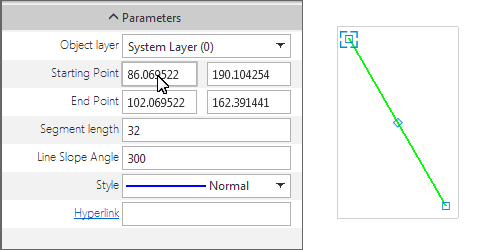
Highlighting a segment vertex
Highlighting elements is done when editing objects (either with launching the editing process, or without), also during creating objects. In the latter case only those elements are marked which are already defined. For example, when setting the dimension, you can select the appearance of arrows displayed on the dimension line. When you hover the mouse pointer overArrow 1 field in the graphic area, the extreme point of the dimension line, for which the arrow is selected, will be marked with the symbol .
