|
Specifics of working with associative views in the Document tree |
Scroll |
The specifics of the associative view display in the Drawing tree is that its subordinate objects are:
•a model whose image is contained in this view,
•detail sections if they are contained in the view.
Objects constituting a model are grouped into the following sections: Solids, Surfaces, Curves and points, Components (see the figure). The names of the model and its first level objects are subject to the document naming setting in the Drawing tree.
Model objects which do not participate in the formation of its image in a drawing – sketches, auxiliary axes and planes, LCS, etc. – are not displayed in the Drawing tree.
|
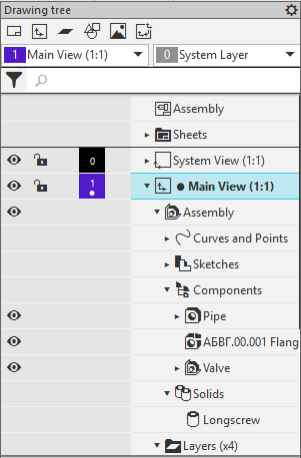
Drawing tree with the associative view of the assembly.
Using Visible  /Hidden
  icons in the left part of the Tree, you can control the display of the entire model or its individual components as a projection view.
The context menu of the model displayed as part of the associative view allows to:
•view the properties of this model,
•assign "unsplittable" assets (for cuts and cross-sections),
•switch to editing that model.
When you select in the Tree a view that is a reference for other views or using another view as a reference, the view relationships are displayed at the bottom of the Tree – the view itself and its source/derived views (see Figure).
|
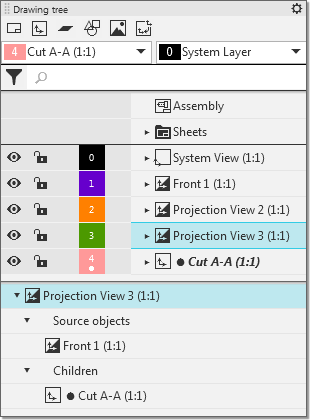
Relations of left-hand view:
the source for it is the Main view, and the derivative is Section A-A view
|
You can control component display in the View using visibility icons |

