|
Sheet Numbering |
Scroll |
Automatic sheet numbering is provided in the text document. If it is enabled, then the number of sheets and their numbers displayed in the Number of Pages and Sheet number graphs of the title block, are automatically determined and depend on the setting.
•Number in the Number of Pages graph:
•can be pre-defined (set by the user),
•can be defined automatically as a sum of sheets of all sections.
•Number in the Sheet number graph.
•Number of the first sheet of the section:
•can be pre-defined (set by the user),
•can be defined by numbering of the previous section; in this case, the number is calculated with the formula S + 1, where S is the total number of sheets in the previous sections (the option is unavailable for the first section of the document).
•Numbers of the second and subsequent sheets are calculated with the formula N + 1, where N is the number of the previous sheet.
|
The sum of sheets includes: •the predefined number of sheets of the section, if this number is predefined; •the actual number of sheets of a section, if it is determined automatically. |

If automatic numbering is enabled for all sections and starts with number 1, then the number of each sheet corresponds to the actual sheet number of the document.
It is possible to exclude separate sections from the numbering. In the Sheet number and Number of Pages graphs, the sheets of these sections will not be considered.
If the automatic numbering is disabled, available becomes manual input of numbers and the number of sheets into the Sheet number and Number of Pages graphs.
Setting up the parameters of numbering for the current document is performed in the Document Tree. A click in the field for calculation of sheets fetches a calculation setup dialog, and in the field for page numbering – a numbering setup dialog. Enable the required option in each of the dialogs and close the dialog by clicking Create Object  .
.
|
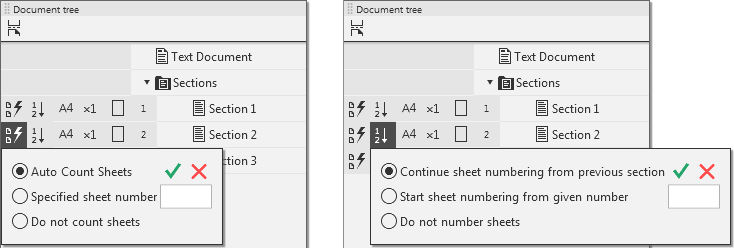
Dialogs for setting up calculation and sheet numbering
Setting up the number of sheets for the entire document (i.e., the contents of the Number of sheets) is performed in the dialog invoked by the Setup – Parameters... command. — Current text document — Document sheet count . (see Section Counting document sheets).
