|
Overview |
Scroll |
Extrusion surface is created by moving a section along a straight–line guide in one direction or in both directions to the specified distance.
You can use the following objects as section of the extrusion surface: face, sketch (sketch area), edge or 3D curve (including a contour plotted by a sketch, on a face, or arbitrary, i.e., with the type Sketch contour, Contour on face, and Arbitrary, see section Selecting a contour type).
When extruding a face, a closed sketch (areas in the sketch), a closed Contour on face, or a Sketch contour, you can create a closed surface. If the section is open, you cannot close the surface. See the examples of plotting closed and open surfaces in the figure.
|
|
|
a) |
b) |
c) |
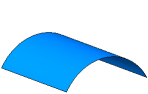
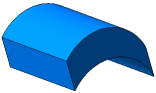
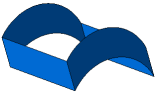
a) section (cylindrical face), b) closed surface, c) open surface
If the section is a planar face, sketch (sketch area), contour plotted by sketch or on a planar face, and it is extruded in the direction perpendicular to itself, then the side faces of the surface may be sloped (see the picture).
|
|
a) |
b) |
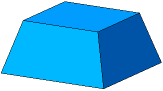
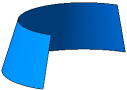
Slope of the side faces of the extrusion surface
a) closed, b) open
When extruding an edge or a 3D curve (including an Arbitrary type contour), faces of the surface may not be sloped or closed. An example of extruding a spatial curve is shown in the figure.
|
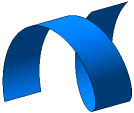
Extrusion surface with spiral section
See Also
