|
Overview |
Scroll |
Shading and color fill of graphic document areas in the KOMPAS-3D system are similar in their construction methods.
To create a hatch or fill you want to set its boundaries. Borders of hatching or fill can be system Main and For broken line style lines, or custom style lines, the settings for which indicate that they can be used as a border for hatching.
In one operation, you can create multiple shaded areas.
If the hatch (fill) in several non-joining areas of the document should have the same parameters, it should be created as a single object. For example, the boundaries of all hatching regions of the section of the part (see figure) should be indicated as the boundaries of a single hatching. This will ensure that the hatching parameters within them are the same and will facilitate its subsequent editing.
|
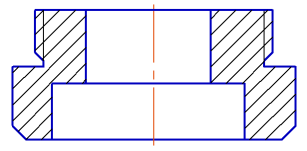
Multiple area hatch
|
To transfer the hatching (fill) parameters previously built in the document to the newly created one, it is convenient to use the Copy properties command. |

See Also
