|
Precision of the dimension value |
Scroll |
Initially, the number of decimal places in the dimension text corresponds to the value set in the Precisions current document settings dialog
When you create or edit a dimension, you can change the precision of displaying its value. For configuring accuracy, a drop-down list Decimal Places is used in the Main section of the Parameter Panel. You can also specify the decimal places when configuring dimension text. In this case, use the list Precision on additional parameter toolbar.
The list is available if the dimension value is calculated automatically – the Auto  button to the right of the Text field is enabled.
In the field Decimal Places, the current number of decimal places in the dimension text is displayed. To change the number of decimal places, expand the list and select the desired value.
If you need to return the default number of decimal places, select the value By Default in the list, marked with an 'asterisk' (the last line of the list).
|
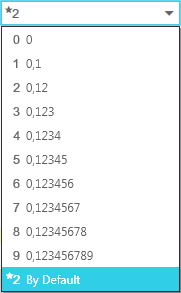
List Decimal places
|
In the angular dimension text, the accuracy setting is valid if the value is displayed in the decimal system. More details on selecting the display format for angular dimensions... |

If the dimension value is entered manually (in this case, the Auto button to the right of the Text field is disabled), the precision setting does not affect it.
