|
Model family: example |
Scroll |
For example, it is required to create several pins that differ in the following parameters:
• name,
• density,
• material,
• diameter,
• length,
• existence of chamfer and its size.
The family template is a model representing a cylinder with chamfers on both edges. To control model parameters, the following variables are created in it (see also the figure):
L — sets the cylinder length,
D — sets cylinder diameter,
CH — specifies the dependence of the chamfer size on the cylinder diameter,
CH_off — specifies the dependence of the presence of a chamfer on the diameter of the cylinder.
All the properties that distinguish pins – Name, Density, Material – are system properties, so creating user properties in the template is not required.
|
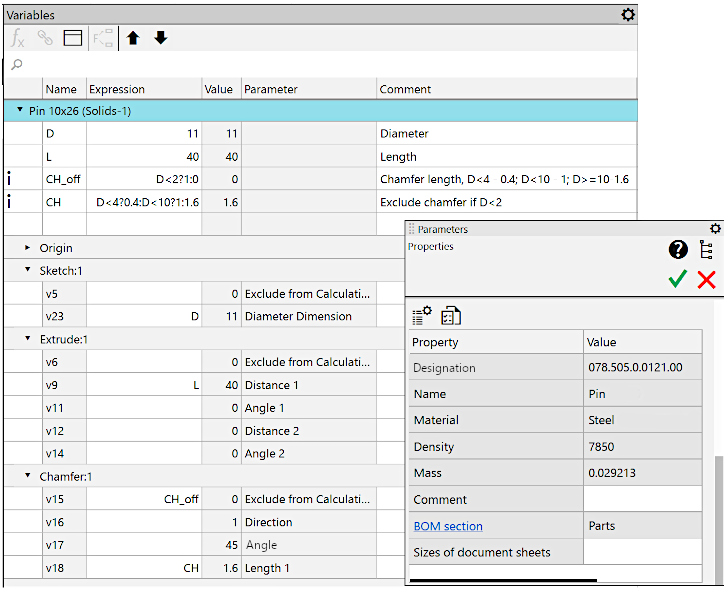
Variables and properties of the pin template
The Family table is shown in the following figure. It contains the "File Name" column and columns of parameters by which instances of pints differ from each other. The operability condition of the Family table is the exact match of column headers with the names of variables and properties of the template model.
|
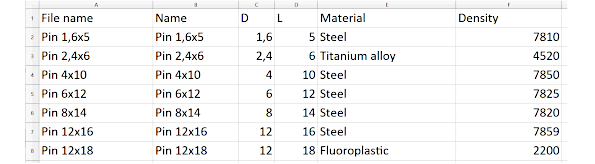
Pin Family table
Take note that when reading variable values from the family table, only the values of independent variables are taken. Values of dependent variables are not extracted from the table (even if they are specified there), but are calculated based on the dependencies available in the template.
For example, in the given model, the variables v9, v13, v31, and v34, which directly determine the parameters of operations, are not independent: they are calculated based on the user-defined variables L and D. Therefore, the values of the L and D variables are specified in the family table. Setting values for variables v9, v13, v31, and v34 in the table in this case does not make sense.
Use of user-defined variables makes controlling model variables more convenient, but it is not mandatory. In cases where operation variables (i.e., variables with names like «vN», where N is the sequence number of the variable) in the template family are independent, the values of these variables should be specified in the family table.
After preparing the family template model and the family table, you can start creating the family models. To do this in the template model, call the command Model family, specify the path to the family table and initiate the generation of instances.
The result of generating instances of pins is shown in the illustrations: on the left, the model files of the pins in the family catalog are displayed, and on the right, the assembly into which all these models are inserted. For clarity, the dimensions are provided in the assembly.
|
|
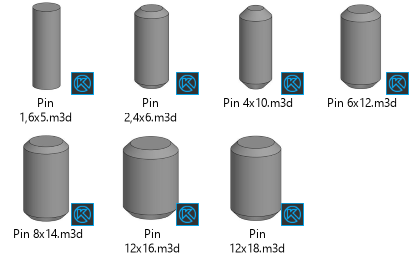
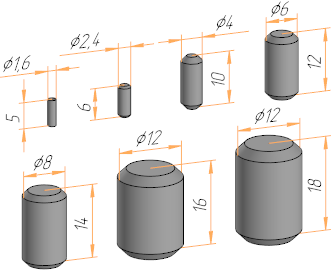
Examples in the pin family: files in the directory and pin models
In the following figure, the properties of the model Pin 12×18.m3d are shown. The values of the properties Name, Density, and Material are extracted from the family table, while the value of the property Mass is calculated based on the volume of the solid and the density obtained from the family table.
|
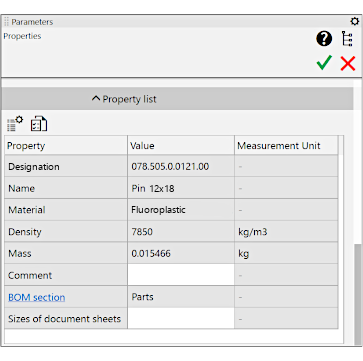
Model properties Pin 12×18.m3d from the pins family
