|
Changing properties of a layer group and a layer filter |
Scroll |
Using the Groups of layers or Layer filters You can set properties — activity, visibility, the option of printing and color — for several layers at once.
To do this, set the desired values of the group (filter) properties in the Document tree, using icons in the line of group (filter) or commands of the context menu. The specified values will be transferred to all layers included in the group (which satisfy the filtering conditions).
The same layer may be included in multiple groups and/or filters. However properties of a layer, wherever it might be located, should be the same. Therefore changing layer properties in one of the groups (filters) spreads to all the entries of this layer.
|
Changing activity and visibility does not affect the current layer. |

If necessary, properties of specific layers can be made different from the properties of the group (filter), by setting the desired values of properties personally for these layers. Besides, properties of a layers may become different from properties of the group (filter) that contains it, if they were changes in another possible entry of that layer (for example, in another group containing the same layer). If such layers are present, the following happens:
•if activity, visibility or option of printing have different values, then the appropriate icon in the group (filter) line is marked with an asterisk (see the figure),
•if the group (filter) and the layers included in it have different colors, then the color displaying field in the group (filter) line becomes grey.
|
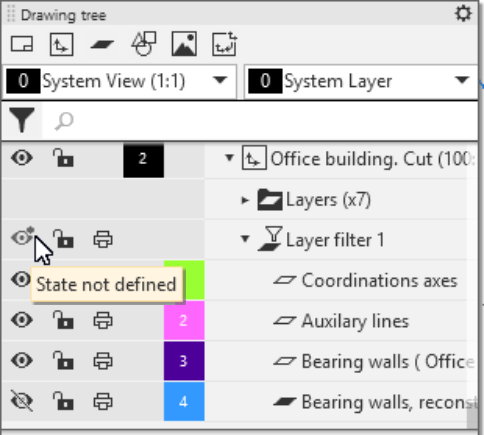
Filter of layers as an example of display of the State Not Defined attribute
|
If the property of one or several filtered layers are changed such that layers will cease to conform to the filtering conditions, they will be deleted from the filter. |
When working with a group or filter of layers, you can not only change properties of layers, but also assign a desired layer as the current one. The attribute of the current layer is displayed in all the entries of that layer.
See Also
