|
Advanced options |
Scroll |
Creating a hole axis
By default, a hole is constructed without the centerline. In order for the created object to have a centerline, open the Additional Parameters section and enable the Axis option. The centerline will be displayed on the hole phantom. After the construction is complete, together with the hole its centerline will be constructed.
Deleting a part of a solid above the hole (processing a canopy)
In some cases a solid in which a hole is created makes a canopy above the hole. You can delete the canopy by extending the hole surface in the opposite direction to the hole building direction. For this purpose open the Additional parameters section and enable the Process overhead option (see Figure).
|
|
a) |
b) |
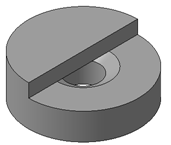
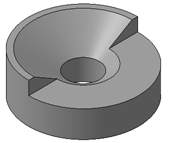
Constructing a hole with countersink
a) option Process canopy disabled; b) option Process canopy enabled
Note the following: if the hole construction does not result in a new face directly above the hole, then the solid material is not removed, as in this case the canopy is considered non–existing (see figure).
|
|
a) |
b) |
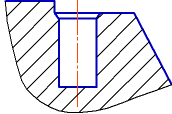
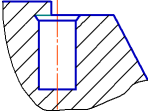
Position of the hole in the model: a) no canopy, b) canopy exists
