|
Configuring the sequence of sets in the list |
Scroll |
You can change the sequence of sets in the list by moving them with the mouse.
You can move only those sets for which display is enabled. A movement marker  is shown in the rows of these sets. Disabled sets are located at the end of the list, their position cannot be changed. More information about managing visibility of sets...
Step-by-step instructions
1.Place the cursor on the row of the set which you want to move.
2.Press the left mouse button and hold it while moving the set up or down. The selected set will swap places with the neighboring sets.
|
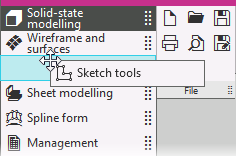
Changing the position of the set in the list of sets
3.When the set reaches the position you want, release the mouse button.
See Also
