|
Setting calculation parameters |
Scroll |
Dialog Object properties appears on the screen after specifying the boundaries of the section of the next figure.

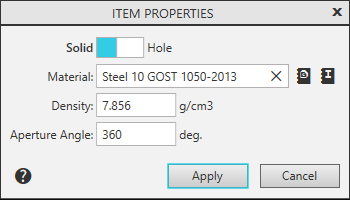
The dialog serves to enter the data necessary for the calculation mass-inertia properties of the solids of rotation or extrusion.
A description of the dialog controls is given in the table.
The element |
Description |
|
Solid/ Hole |
A Toggle Switch that allows you to select whether the specified circuit is the boundary of a solid or a hole. If a hole is selected, the remaining dialog controls are not available. All openings are considered through, i.e. their depth (or the aperture angle) is the same as that of the solid. |
|
|
Select from material density reference... |
Press this button to select a density value from the the density reference file (file ...\\ASCON\\KOMPAS-3D V...\\Sys\\Graphic.dns; the values of the material densities contained in it can be edited by the user). Pressing the button, it opens Dialog material density selection. The designation of the specified material will appear in the Material field, and the value of its density — in the Density field. |
|
Select From reference MaS... |
Click this button to select the material density from the Materials and Scores application connected to the KOMPAS-3D system. The designation of the specified material will appear in the field Material, and the value of its density — in the Density field. |
Material |
Material field. It is filled automatically when selecting a material from the density reference file or from the Materials and Assortment application. The name of the material can be removed by clicking on the icon |
|
Density |
Density field of the material. It is filled automatically when selecting a material from the density reference file or from the Materials and Assortment application. This field is not available for manual entry. |
|
Aperture Angle |
The field for entering the sector angle of the solid of rotation. Present in the dialog when calculating the rotation solids CMP. |
|
Thickness |
Field to enter solid thickness in the direction of extrusion. Present in the dialog when calculating the MP extruding bodies. |


|
If several intersecting or nested contours are specified for the calculation, they are assumed to form one solid of constant thickness (or aperture angle). Therefore, the density of the material and the thickness (the aperture angle) can be set only for the first circuit. |

After setting all parameters, click the Apply button. To exit the dialog without including the contour in the calculation, press the Cancel button.
