|
Overview |
Scroll |
A flanging allows creating a bend in sheet part along a free-form flat edge or a chain of tangentially joined edges.
Creation of a curved edge bend is a deformation operation when the sheet is extended and its thickness decreases. In KOMPAS-3D, this change of thickness is not accounted for when flanges are created in the sheet part.
|
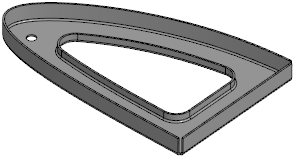
Example of a sheet part with bends along curvilinear edges
The edge along which the flanging is built is a bend base line, and its sheet solid face (outer or inner) is a bend base face. The base face can belong to either a flat portion of a sheet part or to a bend. Examples of creating flangings are shown in the figures.
|
|
a) |
b) |
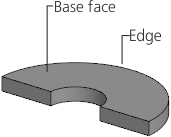
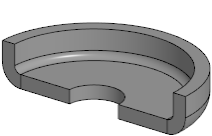
Flanging along the curvilinear edge of a flat face
a) base face and edge, b) result of plotting
|
|
a) |
b) |
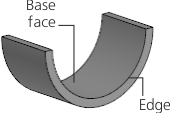
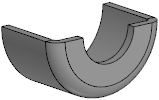
Flanging along the curvilinear bend edge
a) base face and edge, b) result of plotting
The bend surface of the flanging is formed by moving an arc of a given radius along a specified edge, at that the plane of the arc will always be perpendicular to the edge.
The bend of a flanging created along a straight-line edge is cylindrical and does not differ from the bends created using the Bend. That's why the Bend command is more convenient for creating cylindrical bends.
|
Note the following when working with a sheet part that contains a flanging. Flanging along the curvilinear edge or chain of smoothly joining edges, then edges of such flanging cannot be used in operations Flanging and Cap corners. |

See Also
