|
Overview |
Scroll |
The following operations are used to create holes in the sheet part:
• Cut in Sheet Solid forms a hole of arbitrary shape in the sheet part (a sketch is required for construction),
• Hole in sheet solid — creates a round hole in a sheet part.
|
|
|
a) |
b) |
c) |
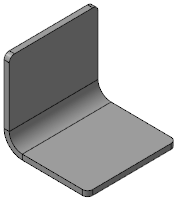
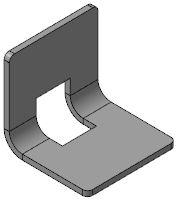

Examples of holes in a sheet part
a) original part, b) cut, c) round hole
|
To create holes in a sheet part, use the Hole in Sheet Solid and Cut in Sheet Solid commands because they take into account specific features of parts from sheet material. |

If the hole includes a bend, the hole is rebuilt when the bend is unfolded. The resulting shape of the hole depends on the hole construction method and on the state of the bend when the hole was created.
|
Holes and cuts can split a sheet part into multiple portions. You cannot create new bends, change the state of existing bends, close bends and build cuts and holes in a sheet part using the By Thickness method. To perform these operations, it is necessary to make a part as whole by editing the existing elements or creating new elements which will join the portions. |

See Also
