|
Updating Tables |
Scroll |
If data in the source document has changed, then the contents of tables in any associative reports need to be updated. If a table is seen inside a document as struck-through, its associative report is irrelevant (see fig.).
|
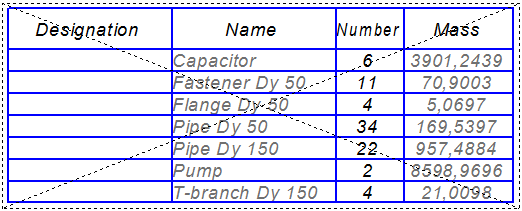
Report on data that has been changed in the source document
To update the report data to the current state, run the Update table from the report context menu, selected in the document.
After this command is called, data in the report will be overwritten with new data from the source document, and the table will no longer be shown as struck–throuh.
|
If data is edited manually when working on a report, it is not updated. |

During any update, the object selection method set in the process of report creation is taken into account.
Tables are also updated when the drawing where the report is placed is rebuilt by running the command Rebuild  .
.
|
Updating a report cancels any changes to settings made in the Data Processing Window: insertion of rows, filtration, grouping, movement of rows, etc. |
