|
Associative reports |
Scroll |
You may create reports that maintain an associative link with the document that includes the objects from which they were created.
Associative relation is formed if the Associative report option on the Parameters toolbar is enabled when a report is created.
|
An associative report should be placed in a graphic document. When placed in a text document, no associative relation between the report and the source document is created. |

An associative report has the following differences from any reports that are created without the Associative report option.
•In an associative report, the continuous relation with the source document – the document that includes the objects from which the report was created – is maintained. Any changes that are made to the objects in the source document and are relevant to the report will be transferred to the report. For example, it is added to automatically if objects are added to the source document, with regard to the method by which these objects are defined.
The relevance of the report is maintained through data updating (see section Updating Tables). The user may terminate an associative relation at a certain stage of managing the report (see section Removing associativity from a report).
•Any associative report is a single object that may be comprised of several tables. In the document, it is displayed in an additional external frame signified by a dotted line, see the figure. A finished report may be edited both in the Data Processing window and in the document in which it is placed (see Section Edit).
|
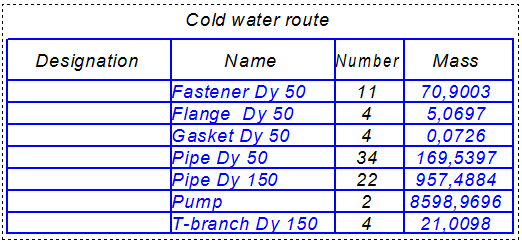
Associative report
The context menu of an associative report contains standard commands for managing an object, such as cutting, copying, creating hyperlinks etc., as well as commands for editing the report in the Data Processing Window, opening the source document, inputting names and updating (see the Figure).
|
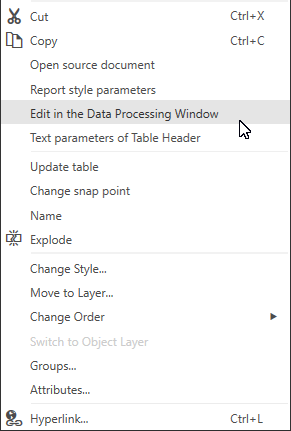
Context menu of the associative report
|
Attention should be paid to the specifics of copying an associative report created using objects from the current graphic document. To have a report copy retain associativity, it is recommended to use the method of copying using the mouse (see section Copying objects using the mouse). |
