|
Data in the form of links |
Scroll |
In the reports located in graphic documents, it is possible to display the contents of report rows in the form of links to the property values in the source document. Such links are created automatically if the Data as References option is enabled in the Parameter Panel when creating the report. They are displayed in the report with the color set for text links (see section Color of text elements).
|
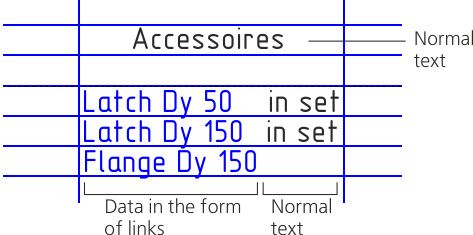
Display of data in the form of links in a report
The created links cannot be edited manually or erased. Before or after the link in the cell, you can enter the usual text – extra caption, designation, special character, etc.
This is possible in the following modes:
•in the document: in the table editing mode (see section Working Techniques);
•in the Data Processing Window: in the report row editing mode (see section Editing a report row).
Data in the form of links in the report, whether in the Data Processing Window or in the document, may change color. This indicates that these links require updating or are no longer valid after losing their link to the source document or object.
Links are updated upon rearranging the report. If a relation is lost, the cause of the loss needs to be identified.
For re-designing the report when working in the Data Processing Window, the Rebuild Table – Update According to Style  command is used.

In an associative report, you can perform the update using the Update table command (see section Table updating).
Converting links to regular text
When working in the Data processing window you can convert data presented in the form of links to regular text. To do this, in the Parameters toolbar, disable the Data as Links option, and then re-design the report using the Re-design Table – Update According to Style command .
The text after conversion is available for editing. If subsequently the option Data in the form of references is enabled again and the report is rebuilt, then the text will become references, and all changes will be lost.
|
Re-designing is, in fact, a re-creation of the report; therefore, if the report was modified manually (text edited/formatted, rows added/deleted, etc.), the changes will be lost after re-designing, then after rebuilding these changes are lost. |

