|
Viewing objects affected by constraint |
Scroll |
While working in constraint display mode, you can view the contents of the required constraint. To do this, hover the mouse pointer over the constraint icon in the graphical area. All objects that participate in the constraint will be highlighted with a color. The object which icon you selected is highlighted by the selection color, and all other objects – by the constraint highlighting color (those colors are selected in the settings). The icons of the selected constraint are also highlighted.
In drawings, the constraint composition view Perpendicularity  is shown for each of the objects included in the constraint. In this example the object with the selected constraint icon is green, and the other object from this constraint is blue.
|
|
|
a) |
b) |
c) |
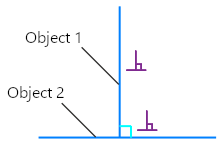
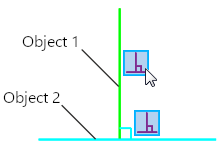
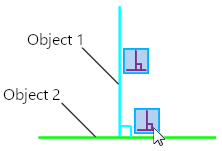
Display of the constraint composition Perpendicularity
a) viewing the constraint, b) viewing the Object 1, c) viewing the Object 2
One object may have several constraints applied. In such cases several icons are displayed for it. The figure shows two segments. A horizontal segment has a constraint Horizontalness  , while a vertical one has Verticalness
  . Additionally, the Equal Length
  constraint has been applied to the segments.
|
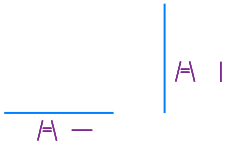
Viewing objects with several constraints
An object may have several constraints of the same type applied. In such cases only one icon of that type is displayed near the object, but it is marked with a dot  (see Figure a). When you hover the mouse pointer over an icon with a dot, a list is expanded with all the constraints of that type, which are applied to the object (see Figure b). You can view other objects, associated with those constraints, by hovering the mouse pointer over the icons (see Figure v).
|
|
|
a) |
b) |
c) |
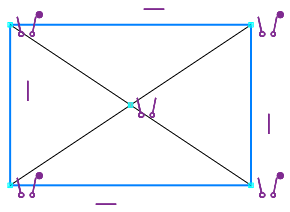
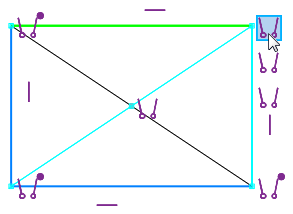
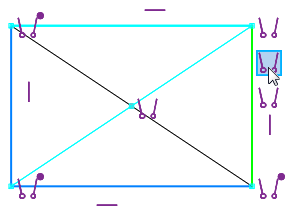
Viewing list of constraints with the same type, applied to object:
a) the list of constraints is collapsed, b) the list of constraints is expanded, c) a constraint is selected in the list
See Also
