|
Overview |
Scroll |
During the process of working with the model, it's available to replace some faces of the solid with other faces. For this, you should sequentially specify the edge to be replaced and the replacing edge. This method of changing the shape of a solid can be useful when editing a model without a construction history.
As a replacement object, you can also use a plane — a auxiliary plane or a coordinate system plane.
When replacing faces, the adjacent faces are lengthened or shortened so that to keep the solid consistent. If the construction of additional faces is required to maintain the integrity of the solid, then the operation will not be performed.
|
|
a) |
b) |
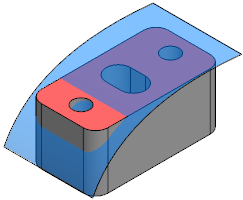
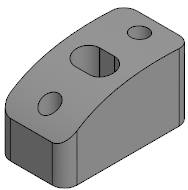
Replacement of a face:
a) face to be replaced and replacing face, b) operation result
|
The replace faces operation is also applicable to surface faces. |

