|
Overview |
Scroll |
In the process of editing the model, you can increase or decrease fillets, the profile of which is a circular arc. To do this, specify the relevant face(s) in the graphics area and set the fillet radius. Changing the rounding dimension in such a way is convenient, particularly when working with models imported from other formats.
When the rounding dimensions are changed, the adjacent faces are elongated (shortened) so that to keep the solid consistent. The operation will not be performed if such modification requires the building of additional faces.
|
|
a) |
b) |
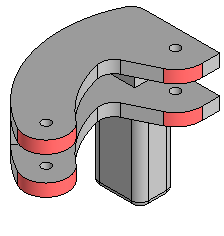
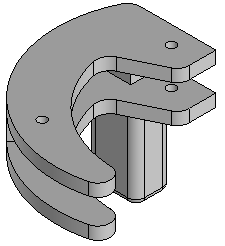
Change fillet size:
a) fillets to change (highlighted), b) operation result — fillet radius decreased
|
The change fillet size operation is also applicable to surface faces. |

See Also
