|
Juts and marks |
Scroll |
To setup the parameters of juts and marks of a coordination axis, the elements located in the Juts and marks sector is used.
The table describes the elements of Jut 1group which allows for setting a jut by the initial point of axis. Protrusion outside the final point is similar to Jut 2 group of elements.
Elements for tuning protrusions and marks of coordination axis
The element |
Description |
|
Mark Type |
The group of buttons allows to set an option of rendering a mark: •Circle, •Double circle. The mark of a set type is rendered from both ends of the coordination axis. |
|
|
||
|
||
Diameter |
A field to enter the diameter of mark circle. In case of rendering a double circle, the field sets the diameter of external circle. |
|
Length |
The field for setting the protrusion beyond the initial point of the coordination axis. |
|
Mark |
The toggle switch controls the rendering of mark at the start of the coordination axis. If the toggle switch is in position I (enabled), then the mark is rendered, in position 0 (disabled) – the axis is built without a mark. |
|
Mark offset |
The field for setting the mark offset from the coordination axis (Fig. a). The zero value means the mark is on the axis. The field is present on the Parameter Panel if the Mark toggle switch is in position I (enabled). |
|
Direction |
The button allows to set the direction of the mark offset from the coordination axis (fig. b). The button is present on the Parameter Panel, if the toggle switch Mark is inposition I (enabled). |
|
Position of bend, % |
The field for entering the value defining the kink relative to the starting point of the axis (Fig. c). The relation is set as a percentage: C = (a/b) · 100, where a, mm — distance from start point to inflection point; b, mm — projection size; C, % — Bend Offset. The field is present on the Parameter Panel if the Mark toggle switch is set toposition I (enabled). |


|
|
|
a) |
b) |
c) |
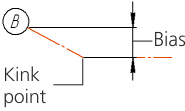
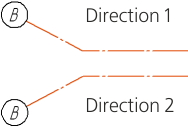
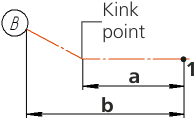
Parameters of the coordination axis jut:
a) mark offset, b) direction, c) kink
The default values of the step and displacement magnitude are set in the section Coordination Axes — Parameters of the setup dialog of the current document.
Parameters of mark of circular coordination axis
To set up the parameters of mark of a circular coordination axis, the elements described in the table are used.
Elements for setting up the parameters of mark of a circular coordination axis
The element |
Description |
|
Mark |
The toggle switch controls rendering of mark on the coordination axis. If the toggle switch is in position I (enabled), the axis has a mark, in position 0 (disabled) – the axis is built without a mark. |
|
Mark Type |
The group of buttons allows to set an option of rendering a mark. Is present on the Parameter Panel, if the Mark toggle switch is set to position I (enabled). The following options are available: •Circle, •Double circle. |
|
|
||
|
||
Diameter |
A field to enter the diameter of mark circle. Is present on the Parameter Panel, if the Mark toggle switch is set to position I (enabled). In case of rendering a double circle, the field sets the diameter of external circle. |
