|
Automatic creation of the break in the associative view |
Scroll |
In views obtained by using the commands Projection View, Cut/Section, View in Arrow Direction, the breaks can be created automatically. To that end, the following conditions must be met:
•in the reference view, a break was created using the break of view command,
•the direction of projection is parallel to the direction of break of the reference view.
If these conditions are not met, the view is created without a break. If necessary, it can be created manually.
Parameters of breaks are passed into a view during its creation. Further link among breaks in the reference and created views is not supported.
|
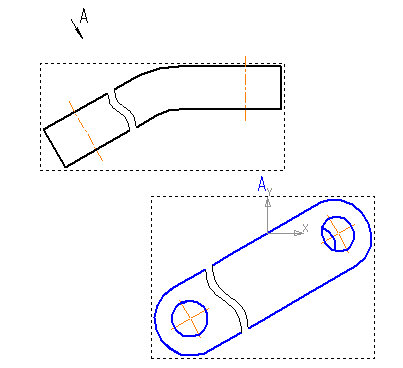
View in arrow direction created on the basis of the view with break
To change the parameters of an automatically created break or to delete the break, run the command Break in View.
When editing a break, its parameters are set the same way as during creation (see the section Creating a break). To delete a break, delete its name from the breaks field of the Parameter Panel and confirm the operation.
Enabling/disabling the display of a break is performed by the Show breaks command of the context menu of the view.
See Also
