|
Overview |
Scroll |
The graphic document tree displays the document structure and allows working with objects which constitute a structure (see the Figure below).
For a drawing, these are the following objects:
•sheets,
•views,
•layers,
•inserts:
•fragments,
•figures,
•views from other drawings,
•macro-elements.
For a fragment, these are only layers, insertions and macro-elements, since a fragment does not contain any sheets or layers.
Objects appear in the Tree automatically after they are created.
To enable/disable display of the Document Tree toolbar, the process is executed by the Options — Toolbars — Document Tree command.
Objects are selected in the Tree with a mouse click. An object selected in the Tree (except the sheet and layer) is highlighted in the graphic region.
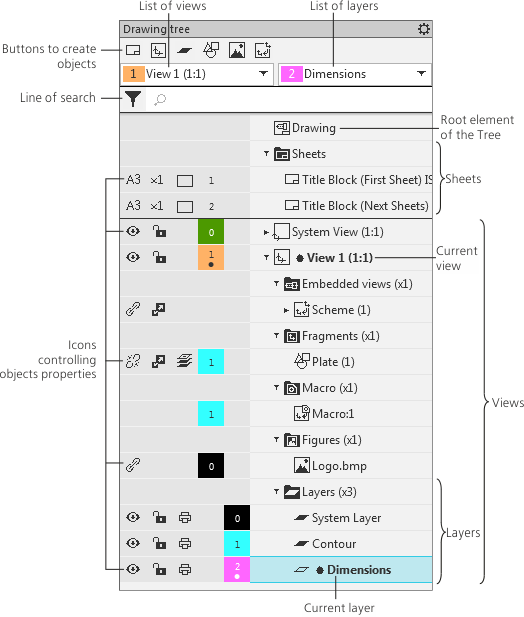
Drawing tree
The upper part of the Tree toolbar includes:
•Buttons to create new objects which constitute the document structure. Note that a new layer or insertion are created in the view which was current when the button was pressed to create a layer or an insertion.
•Lists of views and layers. The list of views displays the name of the current view; the list of layers displays the name of the current layer in this view. To change the current view and layer, select the required line from each list.
•Search bar for searching objects in the Document tree. The name of the sought for object should be entered into this line. If necessary, use filters. For more detail on search...
The rest of the toolbar comprises the Tree:
•The root element of the Tree is the current document — a drawing or a fragment.
•Sheets.
•Views. Each view forms a separate branch of the Tree. View includes the following:
•layers,
•inserts,
•macro-elements.
If a view is associative, the branch also displays the source model and its constituent objects. More details on working with associative views...
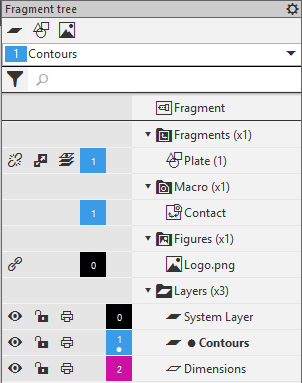
The Fragment tree comprises no sheets and views: the root element is immediately followed by insertions and macro-elements, see the figure.
|
The number of view or layer is displayed in a special field in the left-hand part of the document Tree. The same field also displays:
•the color of view/layer in the active state – the field background (by default – black),
•a sign that the view/layer is current — a dot under the number.
Macro-elements and inserts of figures also have color fields with numbers. They show which layer an object belongs to. A fragment insertion only has such a field if all the fragment objects lie on the same layer.
The  button in the Tree header opens a menu that contains commands for accessing the settings dialogs for: drawing views, drawing layers, and naming of the document in the Tree.
